


SoundBridge Interface
SoundBridge Interface
Couldn't load pickup availability
Get it between - and -.

SoundBridge Interface
💯 The Haltrix Guarantee
💯 The Haltrix Guarantee
We’re confident you’ll love Haltrix's performance — and back it up with:
- 30-day satisfaction guarantee — if you’re not completely happy with how the item works, return it for a full refund.
- 12-month manufacturer warranty — covers defects in material or workmanship. Buy with peace of mind.
📝 Description
📝 Description
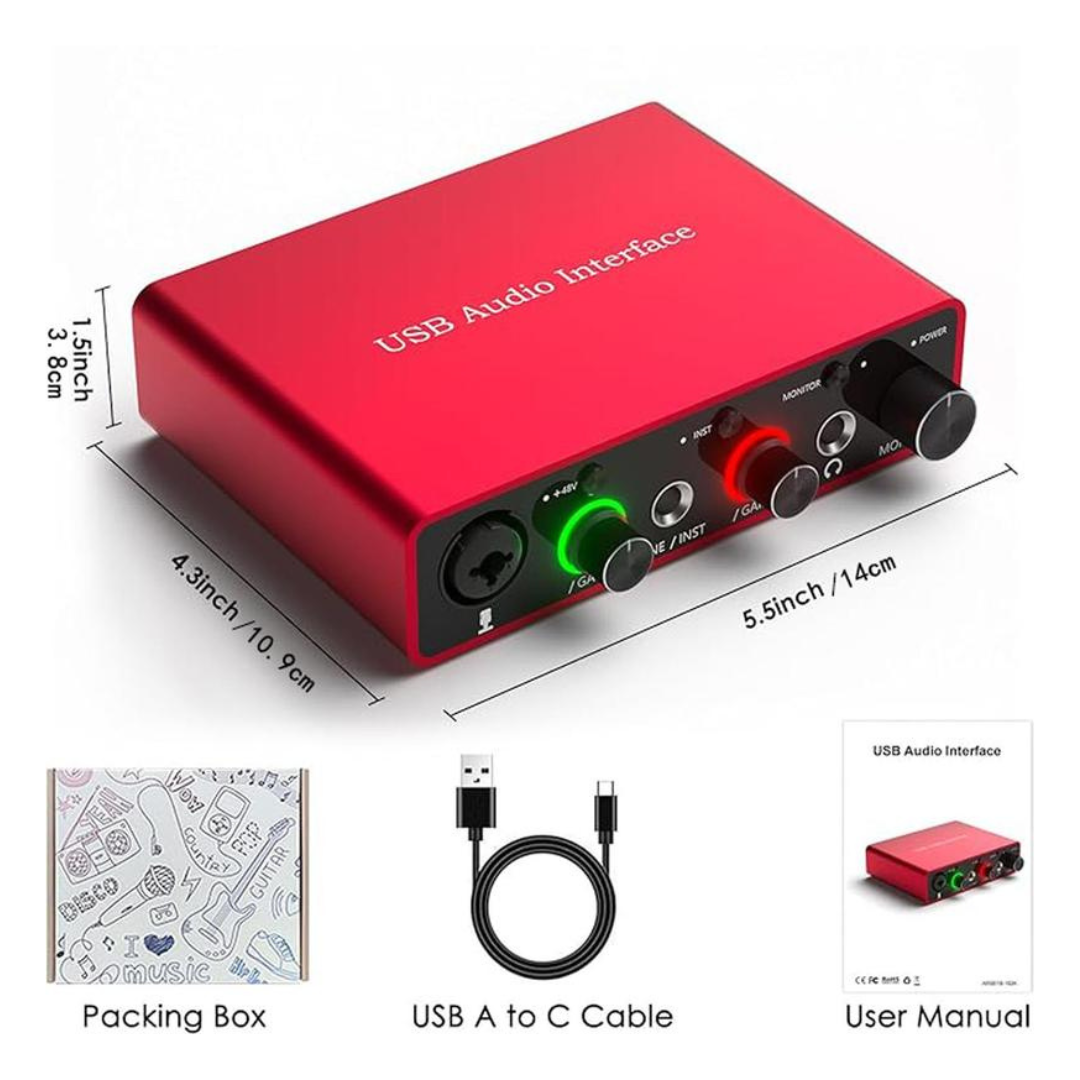
Create clearer recordings and take better control of your audio with the SoundBridge Interface. This compact USB audio interface connects microphones, headphones, and other compatible audio equipment to your computer, making it a practical choice for podcasting, streaming, voice recording, music, and content creation.
With XLR microphone support, adjustable input and output controls, headphone monitoring, and a durable metal housing, the SoundBridge Interface keeps essential audio controls conveniently within reach.
SPECIFICATIONS:
- Product Type: USB Audio Interface
- Microphone Input: XLR
- Phantom Power: 48V Support
- Audio Connection: USB-C
- Headphone Output: 3.5mm
- Line Outputs: Left & Right
- Controls: Mic Gain, Headphone & Main Output
- Monitoring: Direct Headphone Monitoring
- Housing: Metal
- Suitable For: Recording, Podcasting, Streaming, Voiceovers & Music
What's Included
- 1 × SoundBridge Interface
- 1 × USB Cable
- 1 × User Manual
❓ How to Use
❓ How to Use
- Place the SoundBridge Interface on a stable surface near your computer and recording equipment.
- Connect the interface to your computer using the supplied USB cable.
- Connect your compatible microphone to the microphone input.
- Enable 48V phantom power only when using a microphone that requires it.
- Connect headphones to the headphone output for monitoring.
- Connect compatible speakers or other equipment to the left and right line outputs when required.
- Gradually adjust the microphone gain, headphone level, and main output controls to comfortable levels.
- Select the SoundBridge Interface as your input and output device in your computer or recording software.
- Start recording, streaming, podcasting, or creating your content.


See Why People Love Our SoundBridge Interface

Build a Better Recording Setup
The SoundBridge Interface puts your microphone, monitoring, and essential audio controls together in one compact desktop interface.

Take Control of Your Sound
Connect your microphone, plug in your headphones, adjust your levels, and let the SoundBridge Interface become the center of your creative setup.

Recording Made More Convenient
98%
appreciated having essential audio controls within easy reach.
95%
enjoyed the convenience of direct headphone monitoring.
90%
found the compact design easy to integrate into their recording setup.
Results based on 90-day consumer usage.
Give Your Ideas a Clearer Voice
Whether you're recording a podcast, streaming, creating voiceovers, or working on music, the SoundBridge Interface provides the essential connections and controls you need in one compact device. Connect your microphone, monitor through headphones, adjust your levels, and focus on creating.
| Haltrix | Others | |
|---|---|---|
| XLR Microphone Support | ||
| 48V Phantom Power | ||
| Direct Headphone Monitoring | ||
| Individual Audio Controls | ||
| Left & Right Line Outputs |
Testimonials
FAQ
What is the SoundBridge Interface used for?
What is the SoundBridge Interface used for?
It connects compatible microphones and audio equipment to a computer for recording, podcasting, streaming, voiceovers, music, and other audio projects.
Does it support XLR microphones?
Does it support XLR microphones?
Yes. The SoundBridge Interface includes an XLR microphone connection for compatible microphones.
Does it provide 48V phantom power?
Does it provide 48V phantom power?
Yes. 48V phantom power is available for compatible condenser microphones that require external power.
Can I connect headphones?
Can I connect headphones?
Yes. A dedicated headphone output allows you to monitor your audio directly through the SoundBridge Interface.
Can I connect speakers?
Can I connect speakers?
Yes. Left and right line outputs can be used with compatible powered speakers or other suitable audio equipment.
How long does delivery take?
How long does delivery take?
Standard delivery typically takes 10–18 business days after order processing. Delivery times may vary depending on your location, carrier operations, customs procedures, and other factors beyond our control.
What if my order arrives damaged or incomplete?
What if my order arrives damaged or incomplete?
Please contact our customer service team immediately if your order arrives damaged or incomplete. We will provide a replacement or work to resolve the issue as quickly as possible.